Menu
  • Downloads
  • Knowledge Base
  • Documentation
  • Reputation
  • Email Security Tester
  • Downloads
  • Knowledge Base
  • Documentation
  • Reputation
  • Email Security Tester
home/Knowledge Base/Libraesva ESG/Migrate ATP configuration to Esg 5.6
Popular searches:GDPR, ESG 5 migration guide, "How to configure Libraesva ESG for Microsoft 365"

Migrate ATP configuration to Esg 5.6

25 views 0 March 30, 2026 Updated on June 11, 2026 andrea-celaj

Table of Contents

  • PROBLEM
  • SOLUTION
    • Migration for outbound policies
    • Migration of other policies
    • Final Steps
Print to PDF

PROBLEM

What happens to ATP  configurations when upgrading to ESG 5.6?

SOLUTION

During the upgrade to Esg version 5.6, a migration report is generated. This report, is accessible to admins and contains all the ATP (Account Takeover Protection) legacy configurations, and should be used as a reference for the migration of those not covered by automatic quotas.
During the upgrade to ESG 5.6, access control policies, as well as groups and their members, are automatically migrated.

After the upgrade, the ATP module’s status depends on your existing access control policies: it will remain enabled if policies were already configured, or stay disabled if no policies were set up. In either case, the administrator should review and configure the module as needed.

Migration for outbound policies

The upgrade introduces an automated system for outgoing mail, which classifies members into quota levels based on their traffic volume. Quota levels are configurable in the Quota tab, and are relay based.

  • Default configuration: Senders are automatically assigned to the appropriate quota level, with their quotas dynamically adjusted according to their traffic.
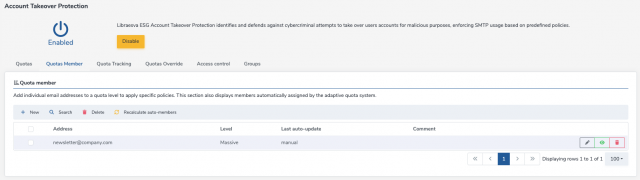
  • Exception configuration: Senders such as newsletters, informational emails, or manual exceptions require manual migration. These must be associated with a quota level in the Quotas Member section.

Example:

A company sends a weekly newsletter to 10,000 recipients. Since this involves a custom traffic pattern and high volume, an exception must be created. For example, the admin could:

  • Set the massive quota level to 10,000 messages.
  • Assign the newsletter’s sender address (newsletter@company.com) in the Quotas Member tab.

Migration of other policies

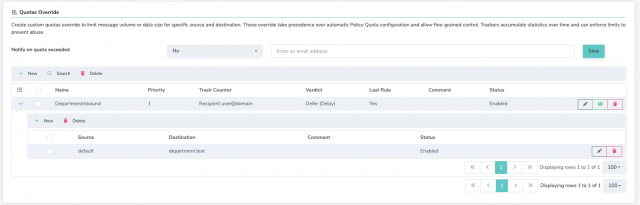
For policies not covered by the automatic system (e.g. inbound policies or custom one), migration must be performed using the Quotas Override section, referencing the legacy configuration from the migration report. The Quotas Override interface allows you to:

  • Define a new quota with a priority level (lower priority = higher precedence).
  • Set a tracker, time period for the quota, and limits (e.g. message count, message size).
  • Specify the verdict (e.g. defer, reject, delete).
  • Mark the rule as last or not. (e.g. there won’t be other policies applied)

In the context of quotas override, the admin can specify source and destination to which the quota applies (it could also use groups).

Examples:

A department receives high volumes of large attachments. A quota override is created to allow 50MB per hour during business hours for all recipients.
Final Steps

After all configurations are migrated, the administrator should:

  • Enable the Policy Quota Module (if it was previously disabled)
  • Enable Automatic Quotas.
  • Apply all pending changes.

The system will automatically generate configurations for all previously unmanaged members.
Note: The Automatic Quota feature requires at least 14 days of message history to populate members accurately (E.g It will not populate quota members on newly created appliances)

Was this helpful?

Yes  No
Related Articles
  • Amazon AWS Instance Sizing Guideline
  • Google Workspace internal forwarding limitation
  • Libraesva Admin Support Account
  • What happens when click on “Mark As” or “Report As”?
  • Libraesva ESG License Expiration
  • Security advisory: command injection vulnerability (CVE-2025-59689)

Didn't find your answer? Contact Us

Popular Article
  • Migrate ATP configuration to Esg 5.6
  • Amazon AWS Instance Sizing Guideline
  • Libraesva ESG License Expiration
  • Libraesva Admin Support Account
  • Google Workspace internal forwarding limitation
Tag Cloud
active content blacklist Cluster Alert Cluster Error delisting delivery disk performance email esva file sandbox gdpr hypervisor ip address memory usage monitoring monitring performance privacy production quarantine disk quicksand rbl reputation retention time sandbox sanitize document security snmp template testing tnef uri sandbox url rewrite url sandbox winmail.dat zabbix

  Migration process from UkCloud due to liquidation

Microsoft Exchange Valid Recipient LDAP returns error  

Products
  • Email Security
  • Email Archiving
  • PhishBrain
  • LetsDMARC
Solutions
  • By threat
  • By business
  • Phishing
Resources
  • Company Website
  • Blog and Insights
  • Email Security Tester
  • Case Studies
  • Webinars
  • Support
  • System status
Partners
  • Partner Portal
  • Become a Partner
Company
  • About Libraesva
  • Contact Us
  • Get free trial
  • Book a demo
LibraCyber

LIBRACYBER SPA
Piazza Cermenati, 11
23900 Lecco - ITALY
VAT ID: 03442930131


LIBRAESVA LIMITED
51 Eastcheap
London EC3M 1DT - United Kingdom
VAT ID: 274381685


LIBRAESVA INC
2608 2nd Ave, Suite 327
Seattle, WA 98121 - United States

  • (C) Libraesva 2024 - All rights reserved

We use cookies on our website to give you the most relevant experience by remembering your preferences and repeat visits. By clicking “Accept”, you consent to the use of ALL the cookies.
Cookie SettingsAccept
Manage consent

Privacy Overview

This website uses cookies to improve your experience while you navigate through the website. Out of these, the cookies that are categorized as necessary are stored on your browser as they are essential for the working of basic functionalities of the website. We also use third-party cookies that help us analyze and understand how you use this website. These cookies will be stored in your browser only with your consent. You also have the option to opt-out of these cookies. But opting out of some of these cookies may affect your browsing experience.
Necessary
Always Enabled
Necessary cookies are absolutely essential for the website to function properly. These cookies ensure basic functionalities and security features of the website, anonymously.
CookieDurationDescription
cookielawinfo-checkbox-analytics11 monthsThis cookie is set by GDPR Cookie Consent plugin. The cookie is used to store the user consent for the cookies in the category "Analytics".
cookielawinfo-checkbox-functional11 monthsThe cookie is set by GDPR cookie consent to record the user consent for the cookies in the category "Functional".
cookielawinfo-checkbox-necessary11 monthsThis cookie is set by GDPR Cookie Consent plugin. The cookies is used to store the user consent for the cookies in the category "Necessary".
cookielawinfo-checkbox-others11 monthsThis cookie is set by GDPR Cookie Consent plugin. The cookie is used to store the user consent for the cookies in the category "Other.
cookielawinfo-checkbox-performance11 monthsThis cookie is set by GDPR Cookie Consent plugin. The cookie is used to store the user consent for the cookies in the category "Performance".
viewed_cookie_policy11 monthsThe cookie is set by the GDPR Cookie Consent plugin and is used to store whether or not user has consented to the use of cookies. It does not store any personal data.
Functional
Functional cookies help to perform certain functionalities like sharing the content of the website on social media platforms, collect feedbacks, and other third-party features.
Performance
Performance cookies are used to understand and analyze the key performance indexes of the website which helps in delivering a better user experience for the visitors.
Analytics
Analytical cookies are used to understand how visitors interact with the website. These cookies help provide information on metrics the number of visitors, bounce rate, traffic source, etc.
Advertisement
Advertisement cookies are used to provide visitors with relevant ads and marketing campaigns. These cookies track visitors across websites and collect information to provide customized ads.
Others
Other uncategorized cookies are those that are being analyzed and have not been classified into a category as yet.
SAVE & ACCEPT

WordPress Download Manager

WordPress Download Manager - Best Download Management Plugin

Popular searches:GDPR, ESG 5 migration guide, "How to configure Libraesva ESG for Microsoft 365"