Table of Contents
Introduction
Customers and auditors regularly ask how long LibraCyber ESG keeps their data, what happens to that data once the time is up, and how they can prove who did what on the appliance. This article answers those questions in one place, so that it can be quoted directly when you reply to a security questionnaire or to a request from a data protection authority.
Keep in mind that ESG is an email security gateway and not an archive. Messages pass through it, they are inspected, and copies are kept only for as long as they are useful for quarantine and troubleshooting. If your requirement is long term preservation of email, the product for that job is LibraCyber Email Archiver. For a wider view of how personal data is handled across all LibraCyber products, see LibraCyber and GDPR.
What ESG stores and for how long
ESG keeps four different kinds of data, and each one has its own retention period. You will find all of them under Admin Area > Appliance > Quarantine Settings, in the Quarantine Retention Settings box at the top of the page.

The first two settings control how long the actual message files stay on disk. Clean message storage retention applies to messages that were delivered without changes, while quarantined message storage retention applies to messages that were held or modified. The other two settings are about information rather than content. Database retention governs the historical data used by searches, statistics and message tracking, and metadata retention governs message headers, the URLs found inside messages and the mail logs.
| Setting | What it covers | Limit |
| Clean M. Storage Retention (Days) | copies of clean or unmodified messages on disk | cannot exceed the spam disk retention |
| Quarantined M. Storage Retention (Days) | copies of quarantined or modified messages on disk | 60 days maximum |
| Database Retention (Days) | historical data behind searches, statistics and tracking | 60 days suggested, up to 365 on low traffic appliances |
| Metadata Retention (Days) | message headers, URLs and mail logs | 31 days suggested, up to 365 on low traffic appliances |
There are three things worth knowing before you change any of these numbers or quote them to a customer.
- On cloud appliances these settings are managed by LibraCyber and cannot be edited
- Longer retention needs more disk space, and a database that grows too large will slow the appliance down. These are not values to raise without sizing the appliance for it
- When a retention period expires the data is deleted, not moved somewhere else. Nothing is kept in the background and nothing can be recovered afterwards.
Message content and message information expire at different times
Once the storage retention expires, the copies of the messages are gone. The information describing those messages stays longer, for as long as the database and metadata retention allow, and that includes sender, recipient, subject, the verdict of the analysis, message headers and the URLs that were found. When you describe your retention policy, these are two separate periods and it is clearer to state them separately.
Audit Logs
You will find the audit log under Admin Area > Status > Audit logs. It lists every action taken on ESG in chronological order, and it goes all the way back to the day the appliance was deployed. The audit log is never rotated, immutable and the retention settings above do not apply to it.
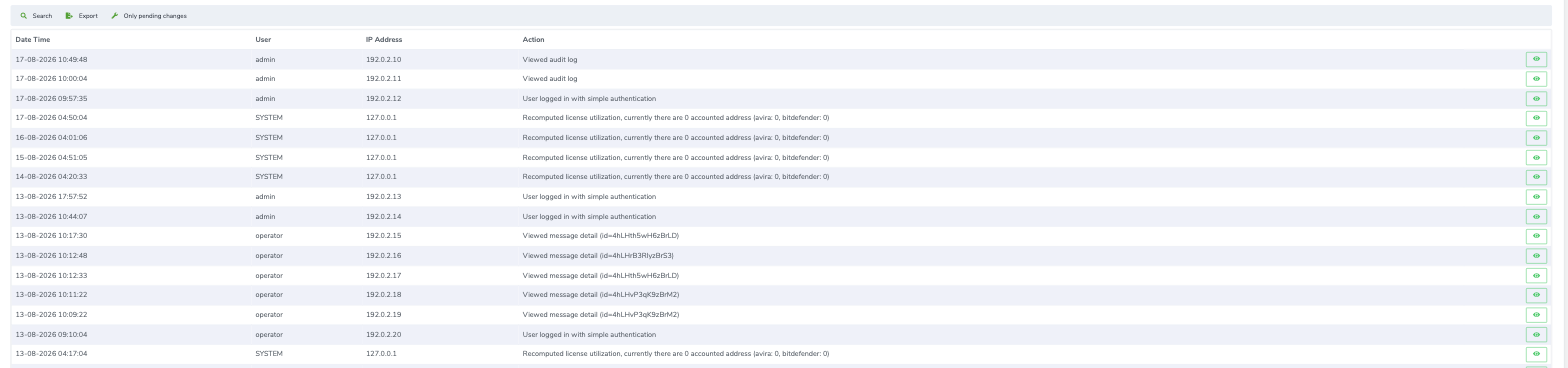
Every entry records the date and time of the action, the user who performed it, the IP address of the client that was used, and a description of what happened. Logins are recorded, and the description tells you whether simple or multi factor authentication was used. Configuration changes are recorded. License operations are recorded. Opening the detail of a single message by the user is recorded too, together with the identifier of that message, and so is opening the audit log itself.
You can search the log and you can export it from the toolbar in the usual formats, CSV and XML, or save it as a document ready to print. The Only pending changes filter is useful when you want to see configuration changes that have not been applied yet.
Whether you can see which messages a user opened
ESG does not know whether someone read an email in their mailbox, because it is a gateway and not a mail client. What it does know is every time a message was opened through ESG itself, from the web portal or from the quarantine, and that action ends up in the audit log with the user, the message identifier, the time and the IP address. So if the question is whether you can demonstrate who looked at a given message, the answer is yes and the audit log is where you find it. If the question is how many emails someone read in Outlook, ESG is not the right source.
Mail Logs
The mail logs live under Admin Area > Status > Mail logs and come in two forms.
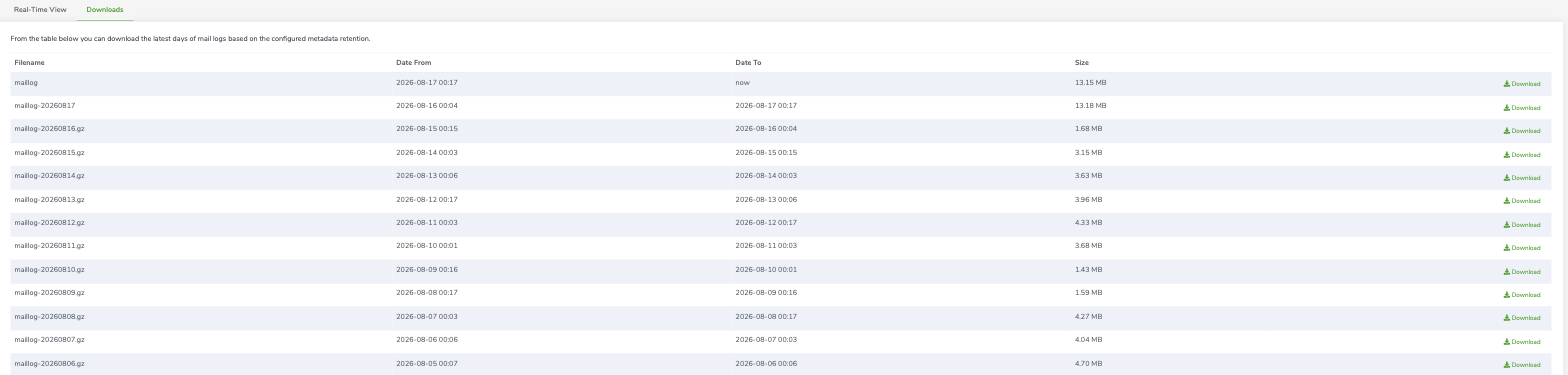
The real time view shows the raw log of the appliance as events happen, and you can narrow it down with a filter written as a regular expression. The Downloads tab gives you the previous days instead, one compressed file per day, ready to be downloaded and kept elsewhere.
How many days you find there depends on the metadata retention you have configured, which is the same setting that governs headers and URLs. With the suggested value you have roughly a month of mail logs available on the appliance.
Log integrity and forwarding
The appliance gives you a complete audit trail since installation, it records administrative actions including simple actions, and it lets you export everything. No administrator (not even LibraCyber admin account) can alter the audit log.
- ESG has the possibility to send Mail Logs through the SIEM HTTP event forwarder, under Admin Area > Integrations > SIEM. The forwarder turns each event into JSON and posts it to an endpoint of your choice, which is normally the collector of your own log management system. The service is disabled by default. To turn it on you enable the forwarder, pick your vendor so that the event format is filled in for you, and provide the URL of your collector. You can add an HTTP header if your collector expects an authentication token. If you are sending events to Splunk, the dedicated article Splunk HTTP Event Collector (HEC) walks through the whole setup.

- ESG has the possibility to send Audit Logs through the Syslog, under Admin Area > Appliance > Networking > Syslog, or REST API, under https://<hostname.appliance>/api.
Common questions from security reviews
Are the logs tamper proof?
On the appliance the logs are held on immutable storage. You can forward email events to an external collector with the HTTP event forwarder, or forward the audit log via the Syslog or API. The audit log on the appliance keeps the full history since installation and records every access and action, including the ones that only read data.
Can user activity be traced?
Yes. Actions and message consultations are written to the audit log with the user, the IP address, the date and time, and the identifier of the message that was opened. The log can be searched by user, action and IP address, and exported as CSV or XML.
How much retention is available?
Retention is configured for the whole appliance rather than assigned to individual users. Clean messages are kept for a few days, quarantined messages for up to sixty days, historical database records and metadata for up to a year on appliances with low traffic. On cloud appliances the periods are the ones set and cannot be changed.
Can email be kept for several years?
Not with ESG. It is a gateway and quarantined messages cannot be held longer than sixty days. When you need long term preservation, with legal hold and certified timestamps, the product for that is LibraCyber Email Archiver